
Uploady Premium: Prices, Plans and Download Limits
Uploady is a file-hosting service available at uploady.io. Users can upload, share and download files through web links. Free downloads involve waiting steps, CAPTCHA and lower speeds. Premium plans offer faster downloading, remove waiting timers, and support parallel and resumable transfers.
Uploady Premium starts at $14.99 for 30 days with 50 GB of daily download traffic. Premium Pro starts at $27.99 for 30 days with 100 GB per day. Both tiers also offer 90-, 180- and 365-day plans.
This independent guide compares the plans, explains their download limits and summarizes our recorded results in Chrome and JDownloader 2.
Uploady Premium and Premium Pro Prices
Uploady offers two paid tiers: Premium and Premium Pro. The main difference is the daily download allowance. At the same duration, both tiers offer the same storage capacity.
The official checkout currently describes these plans as one-time payments without recurring subscriptions.
| Plan | Duration | Price (USD) | Approx. cost per day | Daily download limit | Storage |
|---|---|---|---|---|---|
| Premium | 30 days | $14.99 | $0.50 | 50 GB | 2 TB |
| Premium | 90 days | $35.99 | $0.40 | 75 GB | 3 TB |
| Premium | 180 days | $59.99 | $0.33 | 100 GB | 5 TB |
| Premium | 365 days | $89.99 | $0.25 | 150 GB | 10 TB |
| Premium Pro | 30 days | $27.99 | $0.93 | 100 GB | 2 TB |
| Premium Pro | 90 days | $69.99 | $0.78 | 150 GB | 3 TB |
| Premium Pro | 180 days | $99.99 | $0.56 | 200 GB | 5 TB |
| Premium Pro | 365 days | $149.99 | $0.41 | 300 GB | 10 TB |
Plan details checked on October 10, 2026. Daily costs are rounded and calculated from the listed price and duration. Confirm the final amount and available payment methods at checkout.
Daily download traffic and storage serve different purposes. Traffic is the amount you can download within the daily allowance period. Storage is the space available for files you upload to your account.
Premium vs Premium Pro: Which Plan Should You Choose?
Choose a plan by comparing daily traffic, duration and total price. Premium Pro is mainly relevant when you need more daily download traffic than a suitable standard Premium plan provides.
Match the Allowance to Your Downloads
Standard Premium provides:
- 50 GB per day on the 30-day plan.
- 75 GB per day on the 90-day plan.
- 100 GB per day on the 180-day plan.
- 150 GB per day on the 365-day plan.
Premium Pro provides 100, 150, 200 or 300 GB per day, depending on duration.
A higher daily requirement does not always mean you need Pro. For example, the 365-day standard Premium plan includes 150 GB per day. That is more than the 100 GB daily allowance of the 30-day Pro plan.
If you need 100 GB per day for a short project, the 30-day Pro plan may fit that task. If you expect to use Uploady throughout the year and need up to 150 GB per day, the 365-day standard Premium plan is another option.
Choose a Duration That Fits Your Use
A 30-day plan suits a short download queue or a first purchase. It keeps the upfront payment lower while you test performance on your own connection.
A 365-day plan suits ongoing use. Standard Premium costs about $0.25 per day, compared with about $0.50 per day on the 30-day plan. The annual Pro plan costs about $0.41 per day.
These daily figures are averages across the full period. You pay the listed plan price upfront.
Our recorded tests do not compare Premium and Premium Pro speeds separately. Use the traffic allowance as the main basis for choosing between the tiers.
Free vs Premium: What Changes?
For downloaders, the practical differences are speed, waiting steps, parallel transfers and resume support.
| Feature | Free access | Premium / Premium Pro |
|---|---|---|
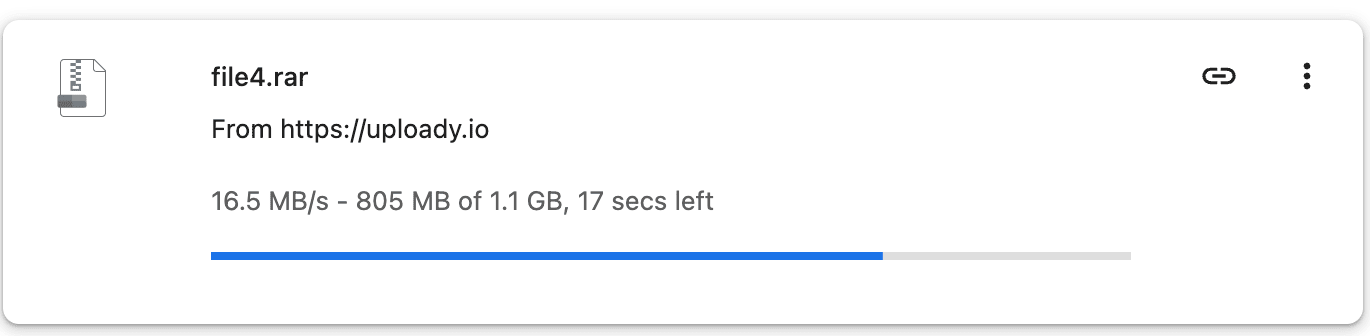
| Recorded Chrome speed | 474 KB/s | 16.5 MB/s |
| Download waiting timer | Applies | Removed |
| Download CAPTCHA | Required | Removed |
| Parallel downloads | One file in the retained free capture | Four active files in the retained JD2 test |
| Resume support | Not listed for free access | Listed as supported |
| Paid daily download allowance | Not included in this comparison | 50–300 GB, depending on plan |
The recorded speeds are observations from individual downloads. They are not fixed account limits or guaranteed results.
Free access may be enough for an occasional small file. Premium becomes more useful for large archives, multiple file parts or regular queues. Resume support also helps when a transfer is interrupted, although an expired temporary link may need to be refreshed.
Recorded Uploady Download Speeds
Our retained screenshots show three different workloads:
| Test workload | Displayed speed |
|---|---|
| Free Chrome: one 767 MB RAR file | 474 KB/s |
| Premium Chrome: one 1.1 GB RAR file | 16.5 MB/s |
| Premium JDownloader 2: four files in parallel | 40.82 MiB/s average total |
In the JD2 capture, the application displayed an average total speed of 40.82 MiB/s and a current total speed of 42.04 MiB/s. These figures cover all four active files combined.
The paid captures showed much higher speeds than the free capture. Actual performance still depends on your connection, ISP routing and the selected file server. Files and transfer conditions differed between sessions.
See the complete Uploady speed test results and screenshots for individual captures and setup advice.
How to Buy Uploady Premium
- Open the official service. Follow the Uploady plans and pricing link and open its Premium options.
- Choose your tier and duration. Compare the daily allowance with the files you expect to download.
- Log in or enter the required account details. Use the account you want to upgrade, or follow the new-account instructions.
- Review checkout. If you have a coupon code, apply it and check the revised total. Select an available payment method and confirm the final amount.
- Check your account after payment. Confirm paid status, expiry date and daily traffic allowance before starting a large download queue.
Official plans currently use one-time billing without automatic renewal. Keep your order details and contact official support if payment or account upgrading needs attention.
Frequently Asked Questions
Does Uploady Premium work with JDownloader 2?
It worked in our test. JD2 displayed a total average of 40.82 MiB/s with four active Uploady downloads. Add your account under Settings → Account Manager and confirm that JD2 recognizes its paid status.
Is Premium Pro faster than standard Premium?
The main documented difference is daily download traffic: 50–150 GB on standard Premium and 100–300 GB on Pro. Our recorded tests do not benchmark these tiers separately, so they do not establish a speed advantage for Pro.
Does Uploady renew automatically?
The official checkout currently lists one-time payments without recurring subscriptions. You buy access for the chosen duration rather than an automatically renewing monthly plan.
What happens if I reach the daily download limit?
Further downloads may be restricted until your allowance resets. Uploady’s terms state that daily bandwidth resets every 24 hours. Check your account for remaining traffic and any status messages.
For more account and download questions, see our Uploady FAQ.
Is Uploady Premium Worth It?
Premium is most useful when you already have Uploady links and need large downloads or repeated queues. It removes waiting timers and CAPTCHA, supports resumable transfers, and worked with parallel downloads in our JD2 test.
For short-term use, compare the 30-day options. For ongoing use, consider the longer plans with their higher daily allowances and lower average costs.